


HDO Box For Firestick: Fast Install Guide, Codes & Setup (2026)
- Developer Options: Click your device name 7 times in Settings > My Fire TV > About to enable sideloading permissions.
- Required Sideload Tool: Install the free Downloader app from the Amazon Appstore.
- Media Player Requirement: Pair HDO Box with the companion MediaOn Player for directional remote control and hardware decoding.
- Zero Jailbreak Safe: Runs within standard Fire OS boundaries without voiding device warranties or modifying firmware.
Watching movies and TV shows on a television screen should be simple and enjoyable. The Amazon FireStick transforms any standard TV into a smart entertainment hub, but finding dependable streaming apps can take time.
HDO Box on Firestick gives you instant access to thousands of movies, trending television series, and international cinema in 1080p Full HD and 4K Ultra HD resolution without recurring monthly fees.
Because HDO Box is not distributed directly on the official Amazon Appstore, you must sideload the application using the trusted Downloader tool. This complete 2026 tutorial walks you through the entire setup process. You will learn how to enable Developer Options on Fire OS, configure Downloader codes, install the companion MediaOn player for remote navigation, and fix common streaming issues.
HDO Box on Firestick App Information
Review the core technical specifications before setting up HDO Box on your Amazon streaming device:
| App Specification | Technical Detail |
|---|---|
| Application Name | HDO Box APK (Fire TV Edition) |
| Package Format | Android Application Package (.apk) |
| Latest Software Version | v4.4.7 (Stable 2026 Release) |
| APK File Size | 30.82 MB (32-bit v7a) / 33.38 MB (64-bit v8a) / 32.52 MB (Universal) |
| Supported Devices | Fire TV Stick Lite, Fire TV Stick (Gen 2/3), Fire TV Stick 4K, Fire TV 4K Max, Fire TV Cube, Fire TV Smart TVs |
| Operating System | Fire OS 5.0 up to Fire OS 8 (Android 7.0 - 11+ base) |
| Required Helper Tool | Downloader by AFTVnews (Free in Amazon Appstore) |
| Companion Video Player | MediaOn Player APK (Required for directional remote control & hardware decoding) |
| Jailbreak Requirement | Zero Jailbreak Required (100% Stock Fire OS Safe) |
| Video Quality | 720p HD, 1080p Full HD, 4K Ultra HD |
| Audio & Subtitles | Multi-Track Audio, Subtitles in 25+ Languages |
| Price / License | 100% Free Media Aggregator Utility |
HDO Box For Firestick: App Overview & Player Requirement
HDO Box is an entertainment search and indexing engine that brings media streams from across the open web into a clean television interface. It organizes cinema by trending releases, IMDB ratings, genres, and release years.
Important: Install Media Player
Modern builds of HDO Box separate the user interface from the video decoding engine. While HDO Box indexes and resolves links, the actual stream playback is handled by the companion MediaOn Player / Drama Player. Installing MediaOn alongside HDO Box ensures smooth directional-pad remote navigation, hardware video decoding, and accurate subtitle synchronization on your FireStick.
What is HDO Box on Firestick?
HDO Box on Firestick is an Android media application customized for TV screens. It crawls active publicly accessible web hosts, tests streaming servers for response speed, and presents working video links sorted by resolution.
Instead of typing URLs into a web browser with an awkward remote pointer, HDO Box provides a leanback TV interface. You can browse high-resolution poster rows, select seasons, and launch full-screen streams with a single click of your Amazon remote control.
Why Choose HDO Box on Fire TV?
- Remote Control Optimization: Designed for directional-pad (D-pad) navigation with clear focus outlines.
- Lightweight System Footprint: Uses minimal RAM, preventing crashes on 1 GB and 1.5 GB FireStick models.
- No Subscription Costs: Stream full seasons and cinema releases without monthly billing commitments.
- 4K Video Scaling: Supports high-bitrate Ultra HD playback on 4K Max and Fire TV Cube hardware.
- Fast Automated Link Resolving: Scrapes multiple servers in seconds so you spend less time searching and more time watching.
Safety & Legal
Is HDO Box APP Safe to Use? (Full Safety Analysis)
Yes. Official, unaltered HDO Box APK packages test clean across 70 antivirus detection engines on VirusTotal, showing zero traces of malware, adware, or trojans. The application runs within standard Android sandbox boundaries and requires no root access or system modifications.
Security and Privacy Considerations
When using third-party media utilities on your home network, keep these safety practices in mind:
- Always obtain APK files from verified sources to avoid repackaged mod files containing adware.
- HDO Box collects zero personal data, requires no user registration, and stores no credit card information.
- All scraper queries transmit over encrypted HTTPS connections.
- For complete privacy from internet service providers (ISPs) that throttle streaming video speeds, connect your FireStick to a trusted VPN.
Is HDO Box legal to use?
HDO Box is a search and indexing tool that does not host, upload, or store video files on its own web servers. Creating and using indexing software is entirely legal. However, accessing copyrighted audiovisual content without distributor licenses may violate copyright regulations depending on your local jurisdiction. Users should verify local laws and consider streaming licensed content or public domain titles.
Top Features of HDO Box For Firestick
Firestick Compatibility & Remote Navigation
The entire interface is built for the Fire TV remote control. You can use the directional ring to browse posters, press the center Select button to choose streams, and use the Play/Pause and Rewind/Fast-Forward buttons during playback.
Simple Movie Browsing & TV Show Sections
Titles are organized into separate Movie and TV Show sections. You can browse by trending popularity, top-rated titles, recent cinema releases, or specific studio collections.
Built-In Media Player & Multiple Playback Sources
The app tests multiple streaming servers simultaneously. If one server slows down or experiences buffer delay, you can pause playback and switch to an alternate host with two clicks.
Full-Screen Playback & Easy TV Viewing
Video streams launch automatically in true 16:9 full-screen mode. The interface hides all on-screen menus during playback, giving you an uninterrupted viewing experience.
Genre Browsing & Trending Content
Browse curated genre categories including Action, Comedy, Science Fiction, Horror, Thriller, Romance, Animation, and Documentaries.
Continue Watching & Watchlist Feature
The app saves your viewing progress. If you exit a movie early, HDO Box places it in your Continue Watching row, allowing you to resume playback from the exact second you left off.
Download Options & Cloud Storage and Favorites
You can mark titles as favorites or download video files to connected external USB drives on supported Fire TV devices for offline viewing.
Search Function & Predictive Results
An on-screen keyboard allows you to search by title, actor name, or director. Predictive search results appear instantly as you enter each letter.
Video Quality Options & High-Definition Streams
Select adaptive video resolutions ranging from 720p HD for slower Wi-Fi connections up to 1080p Full HD and 4K Ultra HD for high-speed fiber networks.
Subtitle System & Subtitle Support
Download verified subtitle tracks in more than 25 languages directly inside the player. You can adjust subtitle text size, color, background contrast, and timing synchronization offsets.
Customizable Features and Settings in HDO Box
Language setting and Subtitle setting
Inside the player settings menu, you can configure your default preferred subtitle language. When you start any movie, HDO Box will automatically fetch and display matching subtitles without manual searching.
Parental Controls
Protect younger viewers by setting a four-digit security PIN in settings to restrict content based on maturity ratings such as PG-13, TV-14, and TV-MA.
Display and Sound Preferences
Customize player aspect ratios (Fit, Fill, 16:9, or Original) and switch between stereo and multi-channel surround sound audio tracks.
Firestick vs. Android Box: Choosing Your HDO Box Fire TV Setup
| Feature / Factor | Amazon Fire TV Stick | Generic Android TV Box |
|---|---|---|
| Operating System | Official Fire OS (Curated & Stable) | Stock Android (Often mobile tablet ROM) |
| Remote Navigation | Seamless D-pad and Alexa Voice Remote | Often requires clumsy air-mouse pointer |
| Hardware Video DRM | Widevine L1 (Official 1080p/4K certified) | Often Widevine L3 (Limited video codecs) |
| Updates & Security | Regular Amazon security patches | Rarely receives firmware updates |
| Portability | Compact HDMI plug-in stick | Bulkier box with separate power bricks |
How to Install HDO Box on Firestick (Step-by-Step Guide)
The process of installing hdo box on firestick takes only 3 to 5 minutes. Because the app is not in the Amazon Appstore, sideloading via Downloader is the safest method to install the verified hdo firestick build on your device.
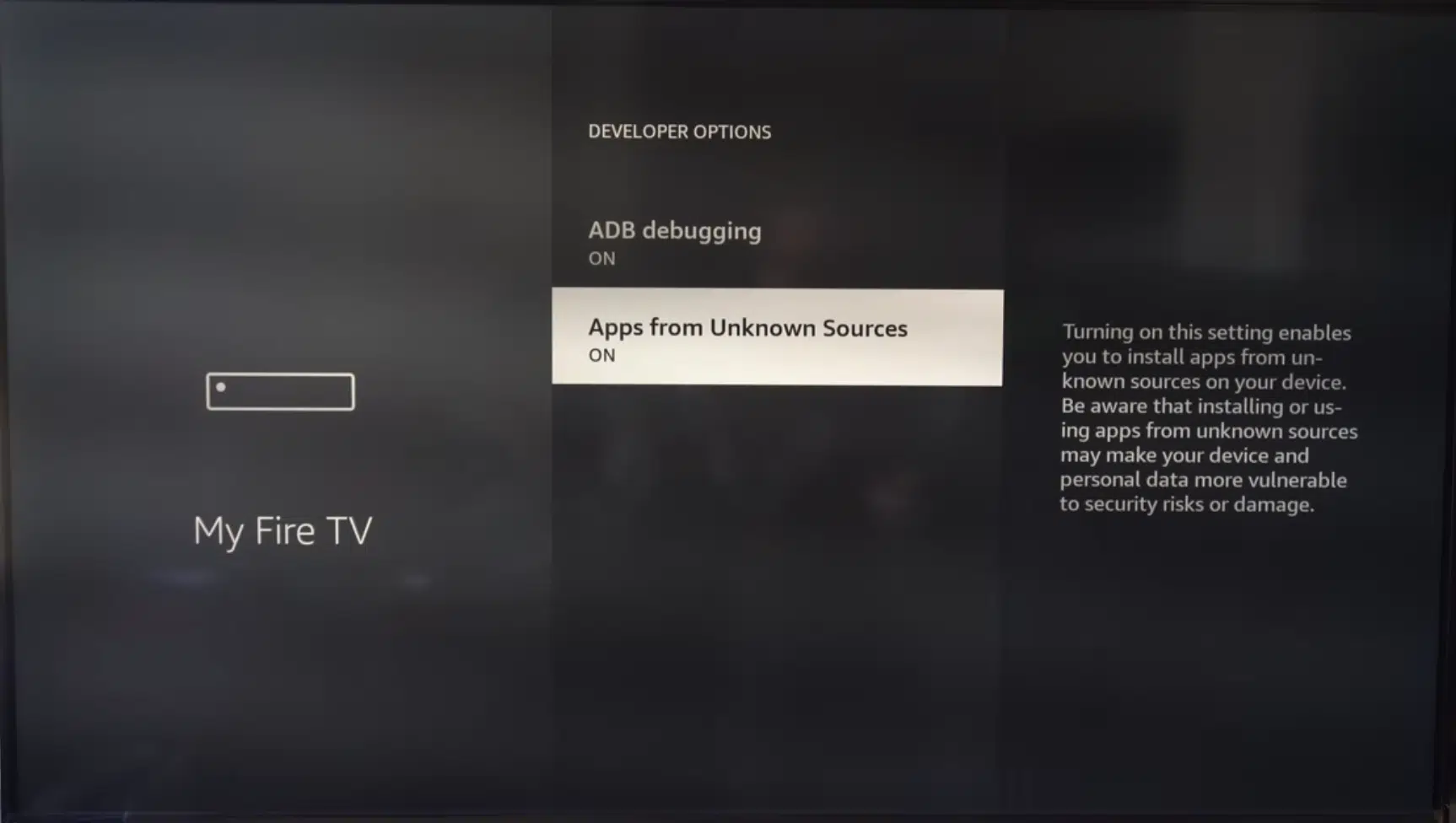
Step 1: Enable Apps from Unknown Sources
Because HDO Box is not hosted on the Amazon Appstore, you must permit your FireStick to install external packages:
- Turn on your TV and navigate to the Settings gear icon on the FireStick home menu.
- Select My Fire TV > About.
- Highlight your device name and click the center Select button on your remote 7 times quickly until you see the message: "No need, you are already a developer."
- Press Back, open the new Developer Options menu, and select Install Unknown Apps.
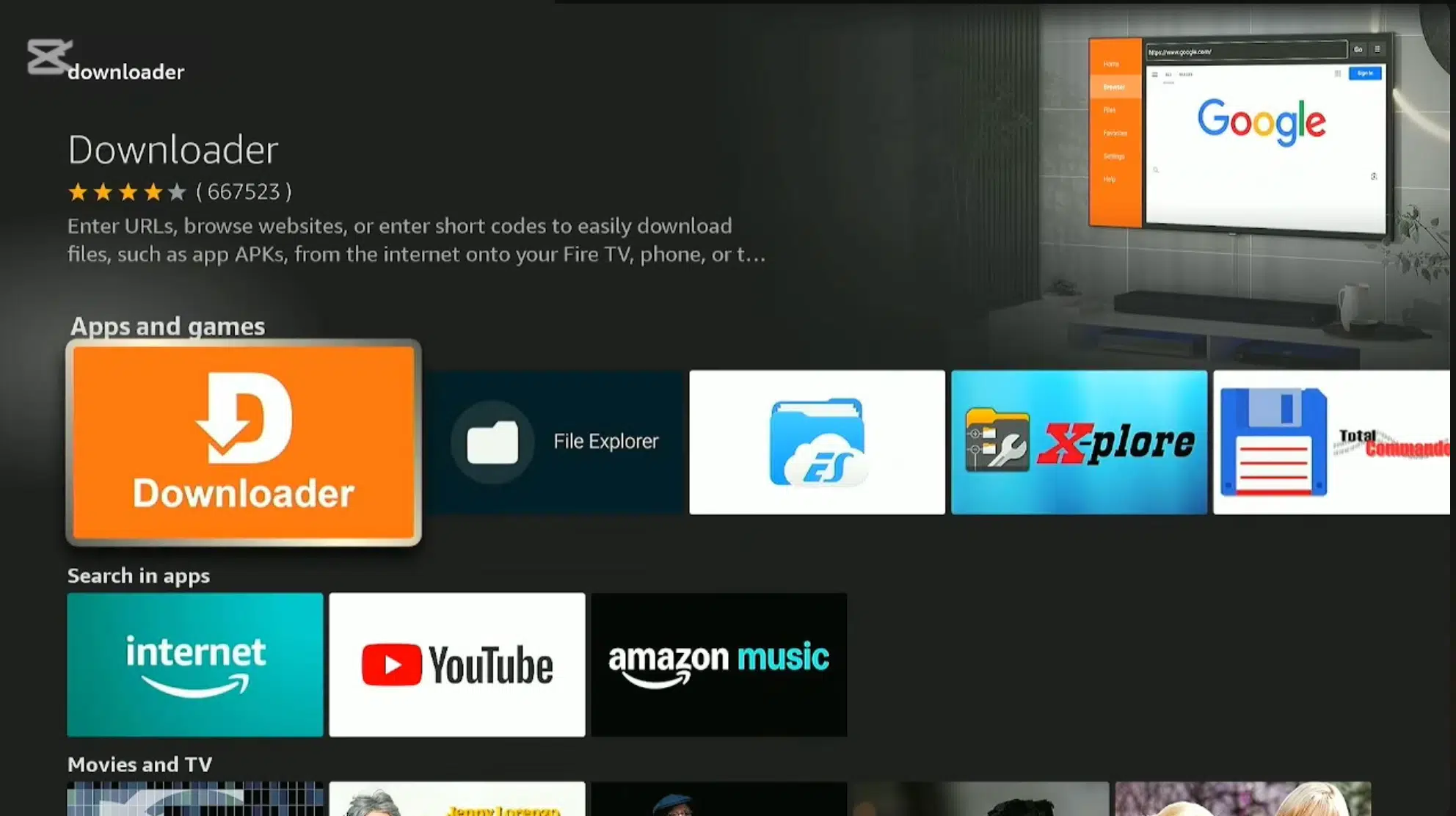
Step 2: Install Downloader App from Amazon Appstore
- Go to Find > Search on the home screen.
- Type Downloader and select the orange app icon.
- Click Download or Get, open the app, and click Allow for storage permissions.
Step 3: Download the APK File via Downloader
Launch Downloader, enter the verified Downloader code 905358 (or direct URL https://hdoboxapks.com/) in the URL field, and click Go to fetch the HDO Box APK (v4.4.7) package.
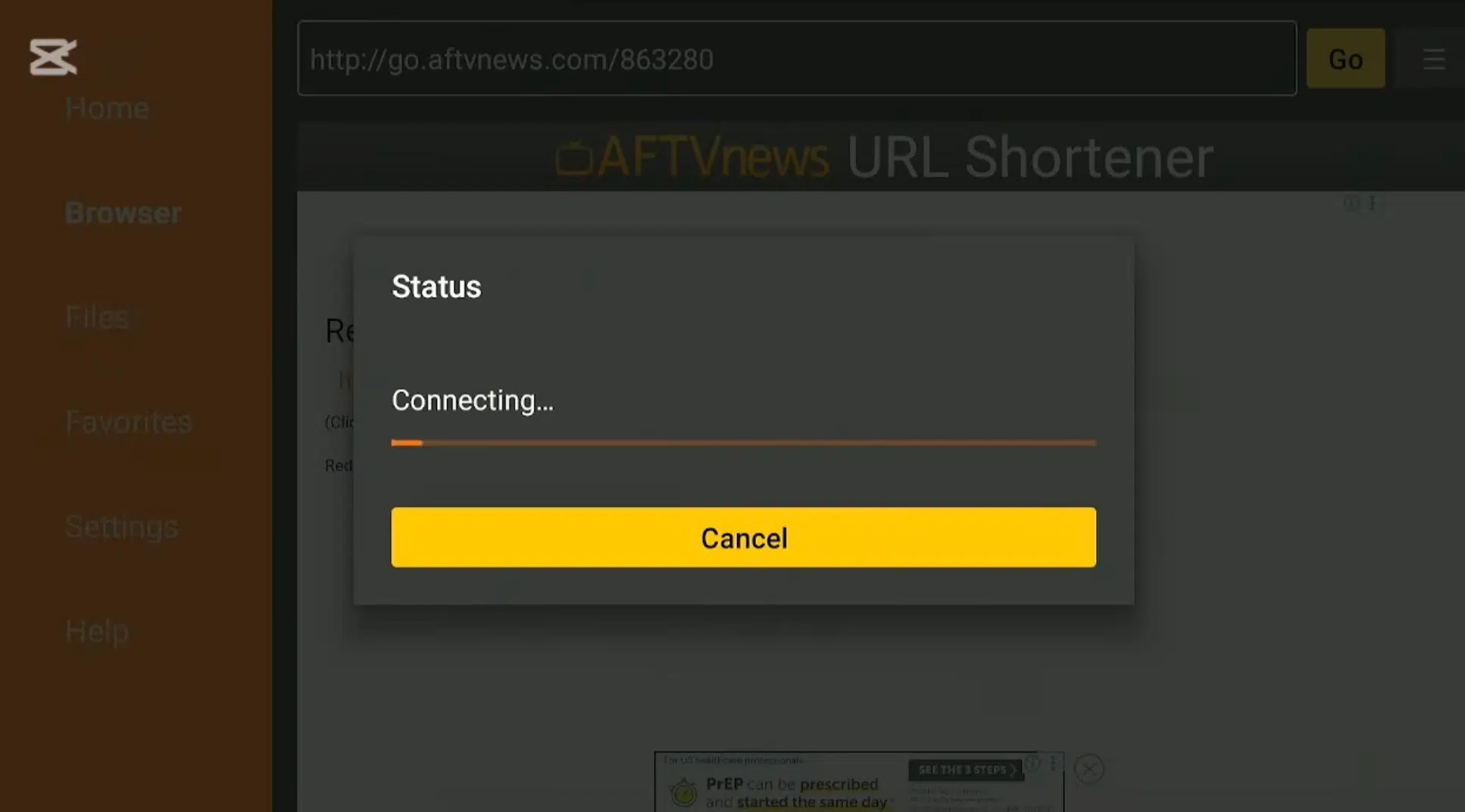
Step 4: Install the Box APK & MediaOn Player
Click Install on the prompt, wait for completion, click Done, and select Delete to clear the temporary installer file.
In Downloader, enter the code 250931 for Drama Player / MediaOn Player APK, click Install, and delete its temporary installer.
Step 5: Start Streaming
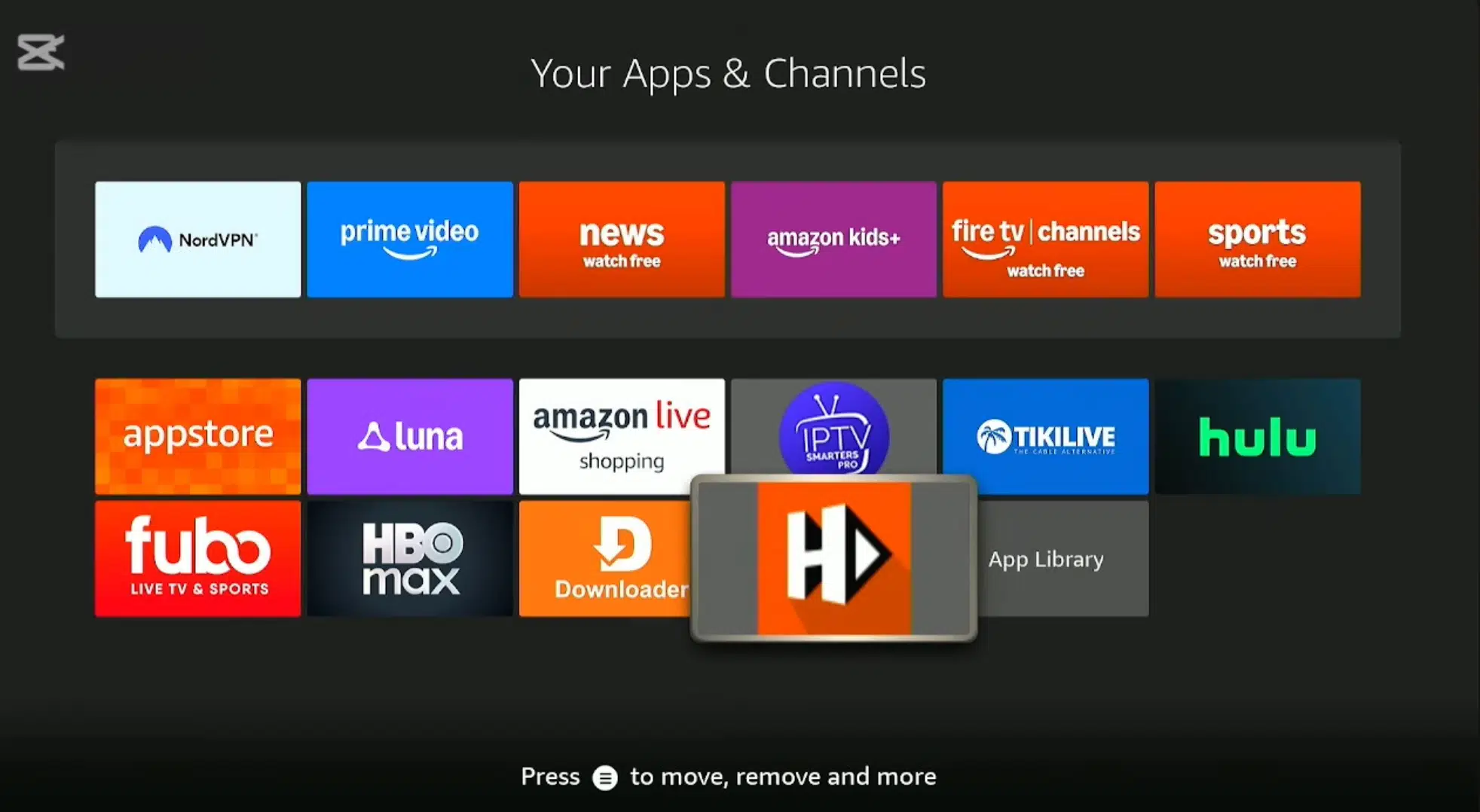
Hold the Home button on your remote, select Apps, locate HDO Box, press Options (3 lines) to move it to your front row, and start streaming movies in HD.
How To Download Express VPN On Firestick?
Using a virtual private network (VPN) on your FireStick protects your streaming activity from ISP tracking and prevents bandwidth throttling:
- Go to Find > Search on your FireStick.
- Type ExpressVPN and download the official app from the Amazon Appstore.
- Log in to your account, click Connect, and launch HDO Box for private, buffer-free streaming.
Comparison Table: HDO Box vs. Other Streaming Apps
| Feature / Metric | HDO Box APK | Cinema HD | Stremio | Netflix (Fire TV) |
|---|---|---|---|---|
| Monthly Cost | 100% Free | 100% Free | 100% Free | $6.99 – $22.99 / mo |
| Interface Quality | Clean, Modern Poster Grid | Classic list scraper layout | Modular modern dashboard | Industry-standard premium UI |
| Remote D-Pad Control | Full D-pad with MediaOn | Full D-pad support | Full D-pad support | Full D-pad support |
| Real-Debrid Support | Yes (High-speed cached links) | Yes (Extensive integration) | Yes (Torrent cloud streaming) | Not applicable |
| Installation Method | Sideload via Downloader | Sideload via Downloader | Sideload via Downloader | Direct Amazon Appstore |
Pros and Cons of HDO Box on Firestick
Pros & Advantages
- 100% free with zero subscription fees.
- Optimized for TV remotes with smooth D-pad controls.
- High-definition 1080p and 4K Ultra HD streams.
- Real-Debrid and Trakt.tv account integration.
- Multi-language subtitles in 25+ languages.
Cons & Limitations
- Not hosted on official Amazon Appstore (requires sideloading).
- Requires companion MediaOn Player installed for video decoding.
- Manual update process when new scraper versions release (How to Update Guide).
Troubleshooting Your Firestick HDO Box Setup
Videos Won't Play (Black Screen or Immediate Return to Menu)
Fix: Install MediaOn Player APK via Downloader. Inside HDO Box settings, ensure MediaOn or Default Player is selected.
Constant Buffering & Slow Stream Loading (Buffering Fix Guide)
Fix: Switch to an alternate streaming server link. Connect your FireStick to a 5 GHz Wi-Fi band or use an Ethernet adapter. Use a VPN to bypass ISP throttling.
App Keeps Crashing on Launch
Fix: Open FireStick Settings > Applications > Manage Installed Applications > HDO Box > Clear Cache. Ensure your device has at least 300 MB of free storage.
Frequently Asked Questions
Can I download HDO Box on Firestick in 2026?
+Yes. You can install HDO Box on any Amazon Fire TV Stick, Fire TV Cube, or Fire TV Smart TV in 2026 using the Downloader application.
Can I play new movies on HDO Box on Firestick?
+Yes. The scraper database indexes new movie releases and airing television episodes daily, providing multiple 1080p and 4K streaming links.
Is HDO Box free to use?
+Yes. HDO Box is 100% free to download and stream without subscription fees, registration requirements, or payment details.
Why does HDO Box have no subtitles?
+If subtitles do not display automatically, click the Subtitle icon on the player control bar during playback and select your preferred language track from the online database.
How to get HDO Box on Firestick without using the Amazon Appstore?
+To get HDO Box on Firestick, install the free Downloader app from Amazon, turn on Install Unknown Apps in Developer Options, and enter verified Downloader code 905358 to download and install the HDO Box APK directly (and code 250931 for Drama Player).
Does HDO Box work on every generation of HDO Box Fire Stick devices?
+Yes, the application is compatible with all Fire OS streaming hardware, including Firestick Lite, Fire TV Stick 4K, Firestick 4K Max, and Fire TV Cube.
Conclusion: Streaming with HDO Box For Firestick
Installing HDO Box For Firestick provides an incredible, subscription-free home theater setup. Pair it with the Drama Player companion, enter Downloader code 905358, and enjoy uninterrupted 4K streaming across all Amazon Fire TV devices.